> ## Documentation Index
> Fetch the complete documentation index at: https://docs.usekafka.com/llms.txt
> Use this file to discover all available pages before exploring further.
# Playbooks
Playbooks are structured guides that Kafka follows for repeated, semi-structured tasks. They're otherwise known as SOPs (standard operating procedures).
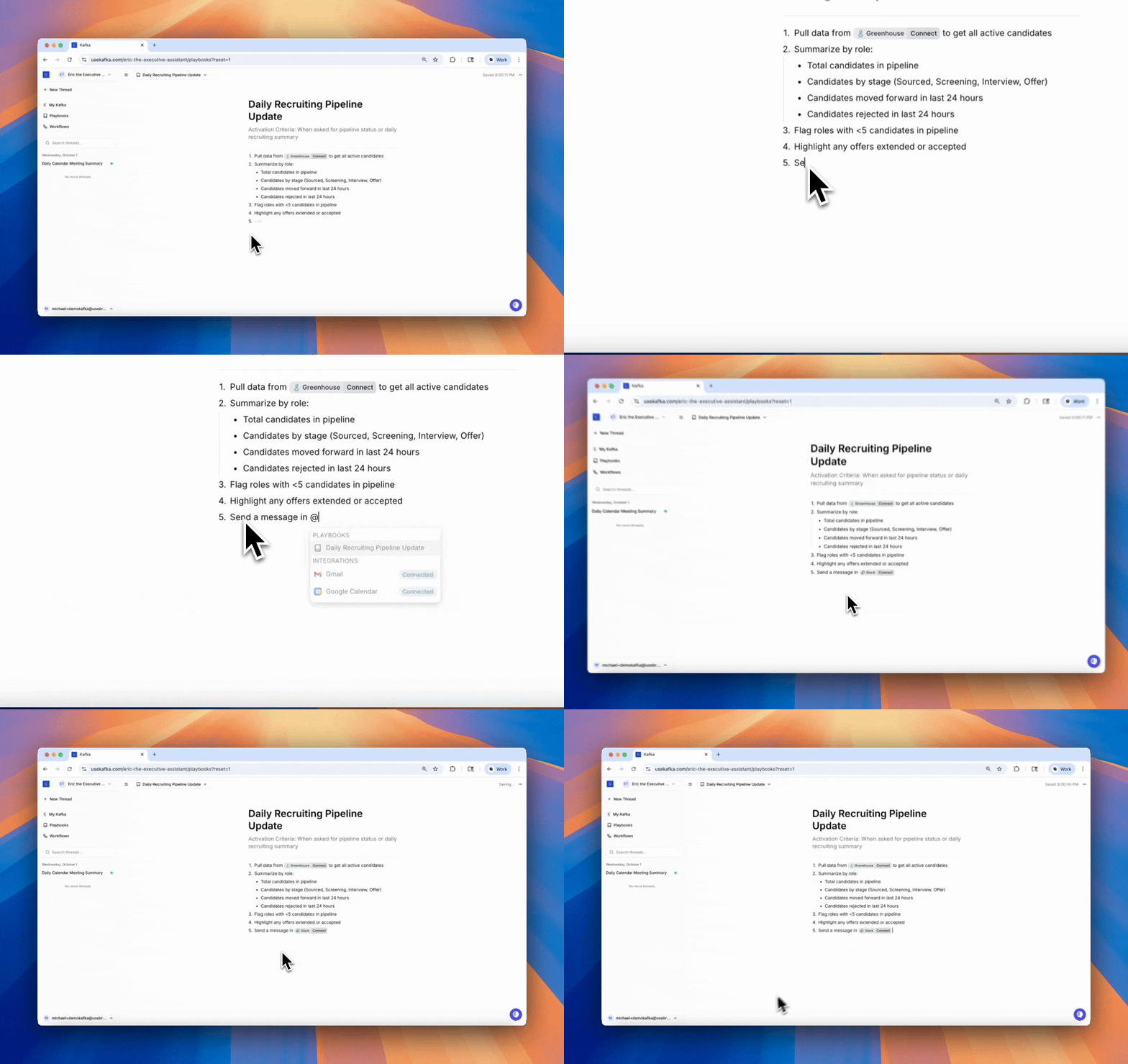 ## How Playbooks Work
Every playbook has an **Activation Criteria** — a situation that triggers Kafka to use the playbook automatically.
Playbooks can also be explicitly requested:
* **By name:** "Use the Daily Pipeline Update playbook"
* **With @:** Type `@playbook-name` in any text editor (threads, workflows, or other playbooks)
## Referencing Playbooks
Playbooks can be called from multiple places:
**In conversations:**
```text theme={null}
"Use the @Structure-Email playbook to draft a message to our investors"
```
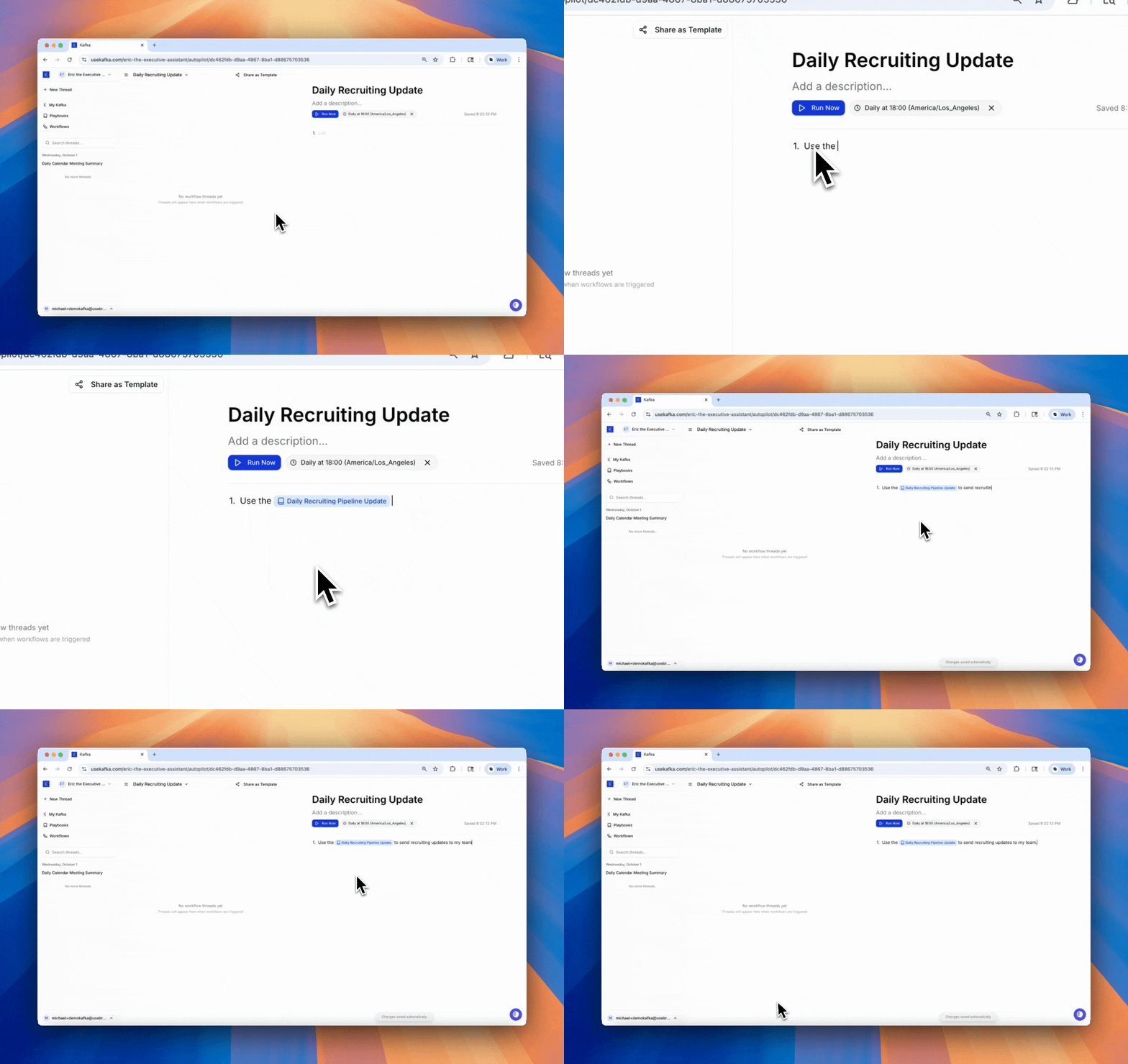
**In workflows:**
## How Playbooks Work
Every playbook has an **Activation Criteria** — a situation that triggers Kafka to use the playbook automatically.
Playbooks can also be explicitly requested:
* **By name:** "Use the Daily Pipeline Update playbook"
* **With @:** Type `@playbook-name` in any text editor (threads, workflows, or other playbooks)
## Referencing Playbooks
Playbooks can be called from multiple places:
**In conversations:**
```text theme={null}
"Use the @Structure-Email playbook to draft a message to our investors"
```
**In workflows:**
 ## Example Playbook
```yaml theme={null}
name: Structure Professional Email
activation_criteria: When drafting an external email to executives or clients
Format:
1. Subject: Clear and action-oriented (5-8 words max)
2. Greeting: Use "Hi [First Name]," for warm contacts, "Hello [Full Name]," for formal
3. Opening: State purpose in first sentence
4. Body: Use bullet points for multiple items, keep paragraphs to 2-3 sentences
5. Closing: Include clear next steps or call-to-action
6. Signature: Use professional signature with title and contact info
Tools: @gmail, @google-calendar
```
## Best Practices
**Define clear activation criteria**
Be specific about when the playbook should be used. "When candidate passes phone screen" is better than "During recruiting."
**Keep instructions actionable**
Each step should be clear and executable. Avoid vague guidance.
**Reference integrations**
Use `@integration` format to specify which tools Kafka should use.
**Make them reusable**
Write playbooks for processes you repeat often, not one-off tasks.
**Nest playbooks**
Reference other playbooks using `@playbook-name` to build complex processes from simple building blocks.
## When to Use Playbooks
Use playbooks for:
* **Repeated processes** — Tasks you do the same way each time
* **Step-by-step procedures** — Clear sequences that need to be followed in order
* **Quality control** — Ensuring consistency across similar tasks
* **Knowledge transfer** — Codifying how things should be done
Don't use playbooks for:
* Fully autonomous tasks (use Workflows instead)
* One-time tasks (just ask Kafka directly)
* Simple single-step actions (not worth the overhead)
## Playbooks vs Workflows
| | Playbooks | Workflows |
| ------------- | ------------------------------ | ----------------------- |
| **Trigger** | Situation-based or on-demand | Event, time, or webhook |
| **Execution** | Semi-structured, collaborative | Fully autonomous |
| **Use case** | SOPs, repeated procedures | Background automations |
| **Reference** | `@playbook-name` anywhere | Cannot be referenced |
## Example Playbook
```yaml theme={null}
name: Structure Professional Email
activation_criteria: When drafting an external email to executives or clients
Format:
1. Subject: Clear and action-oriented (5-8 words max)
2. Greeting: Use "Hi [First Name]," for warm contacts, "Hello [Full Name]," for formal
3. Opening: State purpose in first sentence
4. Body: Use bullet points for multiple items, keep paragraphs to 2-3 sentences
5. Closing: Include clear next steps or call-to-action
6. Signature: Use professional signature with title and contact info
Tools: @gmail, @google-calendar
```
## Best Practices
**Define clear activation criteria**
Be specific about when the playbook should be used. "When candidate passes phone screen" is better than "During recruiting."
**Keep instructions actionable**
Each step should be clear and executable. Avoid vague guidance.
**Reference integrations**
Use `@integration` format to specify which tools Kafka should use.
**Make them reusable**
Write playbooks for processes you repeat often, not one-off tasks.
**Nest playbooks**
Reference other playbooks using `@playbook-name` to build complex processes from simple building blocks.
## When to Use Playbooks
Use playbooks for:
* **Repeated processes** — Tasks you do the same way each time
* **Step-by-step procedures** — Clear sequences that need to be followed in order
* **Quality control** — Ensuring consistency across similar tasks
* **Knowledge transfer** — Codifying how things should be done
Don't use playbooks for:
* Fully autonomous tasks (use Workflows instead)
* One-time tasks (just ask Kafka directly)
* Simple single-step actions (not worth the overhead)
## Playbooks vs Workflows
| | Playbooks | Workflows |
| ------------- | ------------------------------ | ----------------------- |
| **Trigger** | Situation-based or on-demand | Event, time, or webhook |
| **Execution** | Semi-structured, collaborative | Fully autonomous |
| **Use case** | SOPs, repeated procedures | Background automations |
| **Reference** | `@playbook-name` anywhere | Cannot be referenced |